
Alarm Lock Trilogy: How to Change the Master Code and Reset the Lock
The factory master code for each Alarm Lock Trilogy model, the key sequences that change it, how to add user codes and how to reset the lock when the code is lost.

In this guide
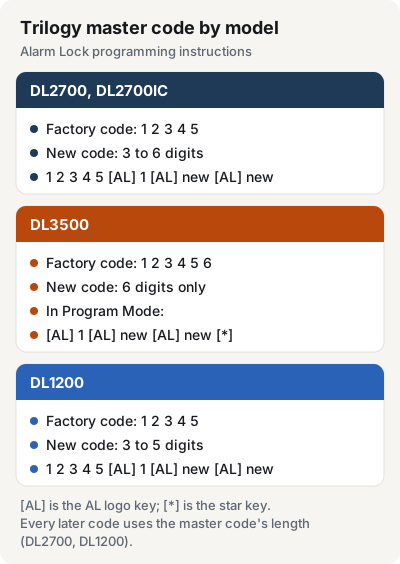
Alarm Lock ships every Trilogy of a model with the same factory master code: 12345 on the DL2700 and DL1200, 123456 on the DL3500. To change it on a DL2700, enter 1 2 3 4 5 AL 1 AL, then your new code, AL, and the new code again. The DL3500 changes it from Program Mode instead. If the master code is lost, the way back that Alarm Lock documents is Erase All Programming, which restores the factory code and clears every user code.
The two keys you program with
Besides 0 to 9, the keypad has two more keys: a star key (*) and a key marked with the Alarm Lock "AL" logo. In this guide, AL means that logo key. These 12 keys are all you need to program the lock.
Key in each sequence steadily. On the DL2700 and DL1200, a pause of more than 5 seconds between key presses cancels the entry and you start again. On the DL1200, the Pass Time setting can lengthen that gap. The DL3500 allows 25 seconds.
DL2700 and DL2700IC-R
The DL2700IC-R is a DL2700 prepped for a Sargent interchangeable core, so it uses the same Trilogy T2 programming instructions. Alarm Lock's steps for a new lock:
- Enter the factory master code: 1 2 3 4 5. A beep sounds and the lock opens.
- Within 5 seconds, enter AL 1 AL.
- Within 5 seconds, enter your new master code and press AL.
- Enter the new master code again. Listen for 6 beeps with a red LED, then wait 5 seconds for the lock to re-lock.
- Test it: enter the new master code. You should hear a beep and the lock should unlock.
To change a master code that is already set, use the same sequence with the current code in front: [current master code] AL 1 AL [new code] AL [new code].
The new code can be 3 to 6 digits; Alarm Lock recommends 5 or 6. Choose the length carefully. Every manager and user code you add later needs the same number of digits, and the only way to change the length is to erase all programming.
On a new DL2700, Alarm Lock's Quick Start puts a start-up step before the code change. It uses nearly the same battery sequence as the factory reset further down.

DL3500 (Trilogy T3)
On the DL3500CRR, all programming happens in Program Mode, and every programming sequence ends with the star key.
- Press the default master code: 1 2 3 4 5 6.
- Wait for the green light, then press AL until you hear several beeps. You are now in Program Mode, and the lock beeps every 6 seconds as a reminder.
- Enter AL 1 AL [new master code] AL [new master code] *. Both entries must match exactly. For a new code of 664433, that is AL 1 AL 664433 AL 664433 *.
- To leave Program Mode, hold down any key for 3 seconds. Several beeps confirm the exit.
The DL3500 master code must be exactly 6 digits. Two short beeps after the star key mean the sequence was accepted. If you press a wrong key, hold any key until you hear 7 short beeps, then start the sequence again. Program Mode ends by itself after 3 minutes without a key press, with a steady tone during the last 15 seconds.
From then on, enter Program Mode with your new code followed by AL.
Changing a code that is already set Alarm Lock warns that the code you want may already exist as a user code. Enable all groups (Function 23), leave Program Mode and enter the code you plan to use. If the door opens, that code is taken, so choose another.

DL1200 narrow-stile trim
The DL1200 accepts no other programming until the factory master code is changed.
- Press the factory master code: 1 2 3 4 5. A beep sounds and the lock opens. If it doesn't unlock, go to the factory reset below.
- Within 5 seconds, press AL 1 AL.
- Within 5 seconds, enter a new master code of 3 to 5 digits.
- Press AL.
- Enter the new master code again. You'll hear 6 beeps with a red LED. Wait 5 seconds for the lock to re-lock.
- Test it: enter the new code. A beep sounds and the lock unlocks.
For a new code of 44444, the whole entry is 1 2 3 4 5 AL 1 AL 44444 AL 44444. Alarm Lock recommends a 5-digit code. As on the DL2700, the length you pick applies to every later manager and user code.
Adding user codes
Once the master code is set, codes go into numbered locations. Each new code needs as many digits as the master code (DL2700, DL1200).
- DL2700 and DL1200: [master or manager code] AL [2-digit location] AL [new code]. Alarm Lock's example puts 22222 in location 01: [master code] AL 01 AL 22222. Six beeps with a red LED confirm it. Manager codes go in locations 00, 10, 20 and so on up to 90, and only the master code can add them.
- To delete a code on the DL2700 or DL1200: [master or manager code] AL [location] AL *. The master code can be changed but never deleted.
- DL3500: in Program Mode, AL 2 AL [user number] AL [new code] *. For user 21 with code 232323: AL 2 AL 21 AL 232323 *. To delete it: AL 2 AL 21 *.
Factory reset: Erase All Programming
Alarm Lock calls the factory reset Erase All Programming. It brings back the factory master code and clears every code and setting, so you'll have to program the lock again from the start. The steps differ by model.
DL2700 and DL2700IC-R
- Remove the battery pack (it sits under the cover at the rear of the lock housing). With the batteries disconnected, press and hold any number key for 10 seconds, then release.
- Connect the batteries and, within 3 seconds, press and hold AL. After you hear 6 more beeps, release AL.
The lock is now clear and ready for new programming, starting with the master code change. If you don't hear the 6 beeps, start over at step 1. Alarm Lock warns that not following the exact procedure can make the lock behave erratically.
For the battery pack and cover, see our Trilogy lock battery replacement guide.
DL3500
- Remove the battery pack.
- With the batteries disconnected, press and hold AL for 10 seconds to discharge the capacitors.
- Put the battery pack back. The lock sounds 3 short beeps. If you don't hear them, start again at step 1.
- Within 5 seconds of the 3 beeps, press and hold AL until the lock starts beeping, then release.
Alarm Lock's Quick Start, which clears the lock the same way, says a series of beeps and LED flashes follows, then 10 seconds of silence. The lock is then ready to program, starting with the master code and the weekday, date and time (Functions 40, 38 and 39).
If you know the master code, you can also clear the lock from the keypad. In Program Mode, Function 99 clears all programming and returns the lock to factory settings: AL 99 AL 000 *. The audit trail is kept. To remove only the user codes and keep the master code, use Function 10: AL 10 AL 000 *.
DL1200
If you know the master code:
- Enter the current master code and wait for the green light. The lock unlocks.
- Within 5 seconds, press AL 0 0 0 AL.
- Listen for 6 beeps. The lock re-locks with all settings and programming erased.
Without the master code, Alarm Lock's alternative method needs the lock taken off the door:
- Insert the key and turn it counterclockwise to reach the battery cover screw. Loosen it with the supplied 5/64 in. Allen wrench just until the cover slides off.
- Disconnect the battery pack.
- Remove the back plate (two Phillips screws, four on some models) without damaging the motor drive wires.
- Find jumper header JP1 near the top of the circuit board and fit the supplied jumper across pins 1 and 2.
- Press and hold AL for 10 seconds to drain all power, then release.
- Connect the batteries and, within 5 seconds, press and hold AL. After 6 more beeps, release it. No 6 beeps means you start over at step 2.
- Test with the default master code, 1 2 3 4 5. A beep sounds and the lock unlocks.
- Move the jumper off pins 1 and 2 and park it on one pin.
- Refit the back plate straight, with the rear pin of the tailpiece in the spindle hole, and replace the screws.
- Mount the lock on the door again, slide the battery cover on and tighten its screw.
Note On the DL1200, pressing keys while the batteries are disconnected can erase all programming. If you only want new batteries, follow the battery steps and leave the keypad alone.
When the lock rejects a code
On the DL2700 and DL1200, a wrong code gets 5 red flashes and 5 beeps. To clear a mistyped code, press AL and enter the correct code right away.
After three wrong codes in a row, the lock turns itself off for about 30 seconds, and 2 beeps with a red flash mark the end of the lockout. The count includes codes from different people entered at different times, so the lockout can kick in after a single wrong code.
Trilogy manuals
Alarm Lock publishes the programming instructions as free PDFs on the Napco tech library:
- DL2700 and DL2700IC: Trilogy T2 DL2700 & TL2700 programming instructions (OI209D)
- DL3500: DL3500 document package with programming instructions (WI1005E)
- DL1200: DL1200 programming instructions (OI310B)
The DL3500 can also be programmed from a PC with Alarm Lock's DL-Windows software. For how the T2 and T3 lines differ, see Trilogy T2 vs. T3.
Trilogy locks we carry
- Trilogy T2 DL2700, cylindrical lever lock.
- Trilogy T2 DL2700IC-R, prepped for a Sargent interchangeable core.
- Trilogy T3 DL3500CRR, classroom mortise lock.
- Trilogy T2 DL1200, narrow-stile trim.
All four are in Door Hardware & Access.
FAQ
What is the default master code on a Trilogy lock?
12345 on the DL2700 and DL1200, and 123456 on the DL3500. Every lock ships with the same code, so Alarm Lock says to change it before anything else.
How do I change the master code on an Alarm Lock DL2700?
Enter the current master code (12345 on a new lock), then AL 1 AL, the new code, AL, and the new code again. Each step must come within 5 seconds of the last. Six beeps with a red LED confirm the change.
How do I factory reset a Trilogy DL2700?
Remove the battery pack, hold any number key for 10 seconds and release. Then reconnect the batteries, within 3 seconds press and hold AL, and release it after 6 more beeps. All codes are erased, and the master code goes back to 12345.
How do I change the master code on a Trilogy T3 lock?
On the DL3500, enter the master code, wait for the green light and press AL until you hear several beeps. In Program Mode, enter AL 1 AL [new code] AL [new code] *. The code must be 6 digits.
I forgot the master code. Can I get it back?
No recovery method is documented. Erase All Programming restores the factory master code, but it also deletes every user code, so you'll have to enter them again.
Steps and key sequences come from Alarm Lock's programming instructions: Trilogy T2 DL2700 (OI209D), DL3500 (WI1005E) and DL1200 (OI310B). The DL2700IC-R option is listed on the DL2700 spec sheet (ALA129K).