
Trilogy Lock Battery Replacement: DL2700, DL3500 and DL1200
Which batteries each Alarm Lock Trilogy model takes, how the lock warns of weak batteries, and the swap steps that keep codes and settings in place.

In this guide
Trilogy DL2700 and DL3500 locks run on five AA 1.5 V alkaline batteries; the DL1200 narrow-stile trim takes two 123-type lithium batteries. To keep codes during the swap, change all the batteries at once and don't press any keys while the pack is out. After the pack goes back in, leave the keypad alone and listen: the beeps tell you whether anything, such as the clock on a DL3500, needs setting again.
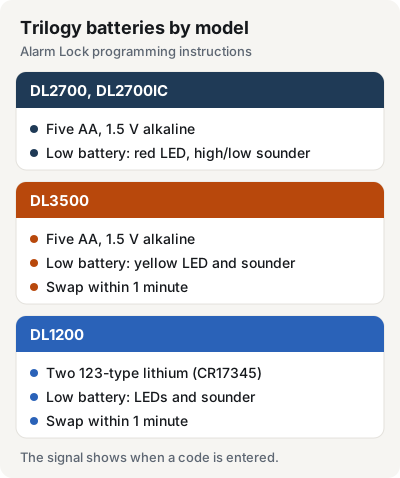
Batteries and warning signs by model
| Model | Batteries | Low-battery signal |
|---|---|---|
| DL2700, DL2700IC | Five AA, 1.5 V alkaline | Red LED flashes with a high/low sounder for 5 seconds |
| DL3500 | Five AA, 1.5 V alkaline | Yellow LED with the sounder |
| DL1200 | Two 123-type lithium (Duracell CR17345) | LEDs light with the sounder |
All three give the signal when someone enters a code. The lock still works on weak batteries, but Alarm Lock says to replace them as soon as possible.
The DL2700 instructions specify Duracell alkaline AA batteries and nothing else.
Before you open the lock
- Have the full set of fresh batteries ready. The DL3500 and DL1200 instructions say to change them within 1 minute.
- Don't touch the keypad while the batteries are out. On the DL3500 that can erase the clock settings. On the DL1200, Alarm Lock warns that it can erase all programming.
- Replace every battery in the pack.
Warning On the DL2700, holding a number key with the batteries disconnected is the first step of Alarm Lock's factory reset, which clears all codes. The full reset steps for each model are in our guide to changing the Trilogy master code and resetting the lock.
DL2700 and DL2700IC-R
- Remove the screw at the rear of the lock housing and take off the cover.
- Take out the battery pack and replace all 5 batteries.
- Put the battery pack back and don't touch any keys for 10 seconds.
- Refit the cover and tighten the screw.
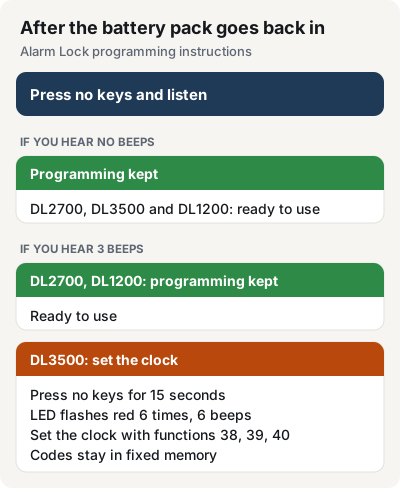
After the pack goes back in, no beeps or 3 beeps one second apart mean the old programming is still there and the lock is ready to use.

DL3500
- At the back of the lock, remove the screw at the bottom of the lock housing and take off the cover.
- Pull out the battery pack and replace all 5 batteries within 1 minute.
- If you don't hear 3 beeps when the power comes back, all programming and settings were kept. Go to step 5.
- If you hear 3 beeps, don't press any keys for 15 seconds. The LED then flashes red 6 times with 6 beeps. Set the clock again with programming functions 38, 39 and 40.
- Refit the cover and tighten the screw.
The DL3500 keeps its programming in fixed memory. After 3 beeps, only the clock needs setting again.
DL1200 narrow-stile trim
- Insert the key and turn it counterclockwise to expose the battery cover screw.
- With the supplied 5/64 in. Allen wrench, loosen the screw just until the battery cover slides off.
- Pull out the battery pack and replace both batteries within 1 minute.
- Slide the cover back and tighten the screw.
Capacitors keep the DL1200 running for up to 1 minute without power, so a quick swap leaves the programming untouched. If you pressed a key or took longer, Alarm Lock's Retain Lock Programming procedure says to reinstall the pack, press nothing for 10 seconds, then listen. No beeps, or 3 beeps one second apart, mean the programming was kept.

Battery pack and power options
The batteries sit in a removable battery pack. In the DL2700 parts list it is part S6040, the Battery Pack Assembly, and the satin chrome battery cover is S6105-26D.
The DL2700 and DL3500 can also run on an external 7.5 V DC power source instead of batteries. For the DL2700, Alarm Lock asks for at least 100 mA from a UL-listed supply, approved for the application, with battery backup and current limiting. The wiring is described in Alarm Lock's installation instructions.
For the differences between the T2 and T3 lines beyond batteries, see Trilogy T2 vs. T3.
Trilogy locks we carry
- Trilogy T2 DL2700, cylindrical lever lock.
- Trilogy T2 DL2700IC-R, prepped for a Sargent interchangeable core.
- Trilogy T3 DL3500CRR, classroom mortise lock.
- Trilogy T2 DL1200, narrow-stile trim.
All four are in Door Hardware & Access.
FAQ
What batteries does a Trilogy lock use?
The DL2700 and DL3500 take five AA 1.5 V alkaline batteries. The DL1200 narrow-stile trim takes two 123-type lithium batteries, Duracell CR17345.
Why is my Trilogy lock flashing red and beeping?
On a DL2700, a red LED that flashes with a high/low sounder when a code is entered means the batteries are weak. Replace all five soon; the lock keeps working in the meantime.
Do I lose my codes when I change the batteries?
Not if you leave the keypad alone while the pack is out. After you reconnect the pack, no beeps or 3 beeps mean the DL2700 kept its programming. On a DL3500, 3 beeps mean the clock needs setting again; the codes stay in fixed memory.
Where is the battery pack on a Trilogy DL2700?
Inside the housing at the rear of the lock, under a cover held by one screw.
Steps and battery details come from Alarm Lock's documents: the Trilogy T2 programming instructions (OI209D), the DL3500 document package with programming instructions (WI1005E), the DL1200 programming instructions (OI310B) and the DL2700 (ALA129K), DL3500 (ALA151C) and DL1200 (ALA476) spec sheets.